Tech Stack
Python, Pandas, Scikit-learn, NumPy, Matplotlib, Jupyter Notebook, TF-IDF
THE PROBLEM
Misinformation spreads fast across digital platforms, often making it hard to distinguish real news from fake. Manual detection is not scalable and generalized spam filters don’t understand the context or credibility of the article. There’s a growing need for content-aware models that can learn linguistic patterns of fake news and flag them early.
THE SOLUTION
Built a complete text classification pipeline to detect fake news articles using classical machine learning techniques and NLP.
Key features :
Text Cleaning – Removed punctuation, stopwords, and performed tokenization.
TF-IDF Vectorization – Converted raw text into numerical feature vectors for training.
Model Training – Implemented and compared models (Logistic Regression, Passive Aggressive Classifier).
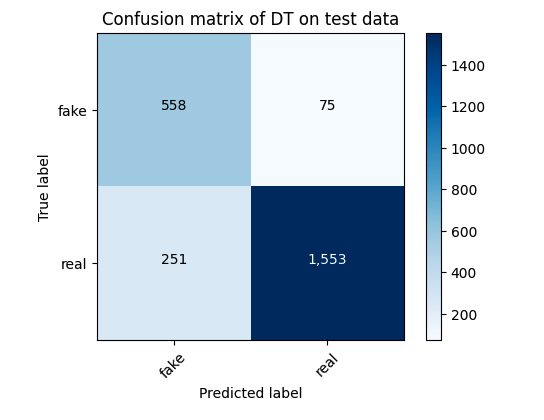
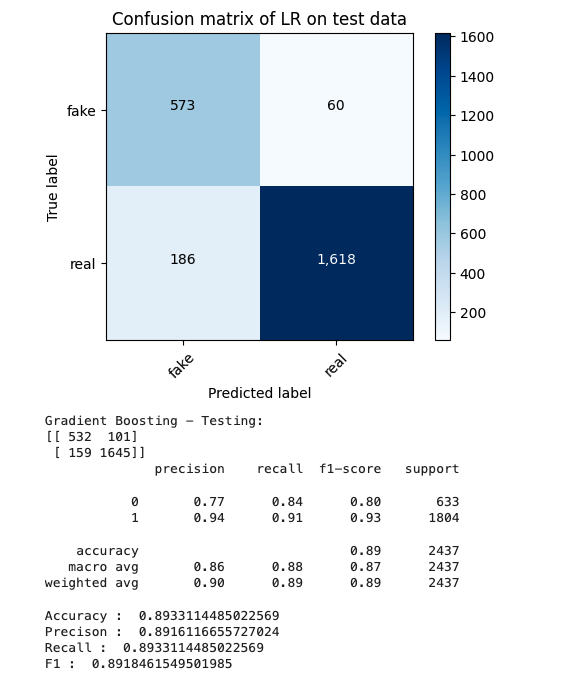
Performance Metrics – Evaluated models using accuracy, precision, recall, F1-score.
Confusion Matrix – Visualized model accuracy and false positives/negatives.
Simple Deployment-Ready Notebook – Can be extended into a Streamlit app or REST API.
THE OUTCOME
Achieved high accuracy in classifying fake vs real news articles with a clean, scalable ML pipeline.
This project demonstrates Fake/Real news-classification :
End-to-end text classification.
Real-world NLP application.
Responsible use of AI for misinformation detection.
It's a strong example of applying classical ML in a real-world problem domain, with potential use cases in journalism, social media, and content moderation tools.